Sacred Geometry Systems — Obsidian Theme
A dark and light theme for knowledge maps, Canvas, and systems thinking.
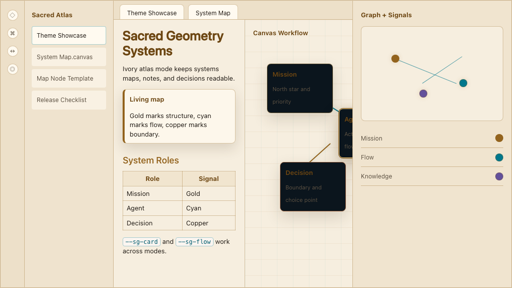
Large vaults and Canvas maps can become hard to read when every note, node, and connection carries the same visual weight.
Use geometry, colour, and clear focus states to make the structure of a knowledge system easier to follow.
An Obsidian theme with dark and light palettes, semantic Canvas styling, graph and callout styles, optional Style Settings controls, and starter Canvas, template, and snippet files.
Theme design and implementation. CSS, Obsidian Canvas, design tokens, and a documented visual system.
- Visual roles should help someone read a map before they decorate it.
- Dark and light surfaces need their own contrast and focus treatment.
- Decorative motion should follow the reader's reduced-motion preference.
Sacred Geometry Systems is an Obsidian theme I created for mapping projects, agent workflows, decisions, and knowledge. It uses a shared visual language for nodes, boundaries, connections, and the centre of a system.
The theme includes dark and light modes, Canvas and graph styling, callouts, and starter material. Optional Atlas Controls expose accent colours, glow, geometry texture, and stronger focus boundaries through Style Settings.
Install
In Obsidian, open Settings → Appearance → Manage, search for Sacred Geometry Systems, and select the theme. For a manual installation, follow the repository instructions.
The latest published release checked on 15 October 2026 is 0.4.1, for Obsidian 1.5.0 or newer. The releases page has the current files and release notes. The preview above comes from the theme repository.